Weighing scale barcode software: scan the label, item and exact weight go on the bill.
Potatoes, sabzi, fruit, meat, dry fruit, mithai — weighed items print a barcode that changes with every weighing. PaakiShop reads the item and its weight straight from the label of your Black Copper RLS1000 or any label scale. No more typing "aaloo" and the weight by hand.
Works on POS, invoices & the offline desktop app · Black Copper and most label scales · Urdu & English
2000123006505Why your scale labels don't scan in normal POS software
The label scale writes the item code and the weight inside the barcode. 0.600 kg, 0.650 kg and 0.700 kg of the same potatoes give three different barcodes — so software that looks for one fixed barcode finds nothing, and the cashier types the item and weight by hand.
From scale to bill in three steps
Set the item code once
Open the item (e.g. Potato) and put the scale's PLU in its Barcode field — for example 123. Sell it in kg with the price per kg.
Weigh and print
Weigh on the label scale exactly as you do today and stick the printed label on the bag.
Scan at the counter
Scan the label on POS or the sales invoice. The item, the exact weight and the amount appear — scan the next label straight away.
Works everywhere you sell
POS counter
Scan into the POS search. The same item merges into one cart line with the total weight (0.650 + 0.400 = 1.050 kg).
Sales invoices
Use the line Scan box or the product search. A new line opens and waits for the next label.
Offline desktop app
The PaakiShop Offline application reads labels with no internet and syncs to paakishop.com later.
Weight or price labels
If your scale prints the total price instead, PaakiShop works out the weight from the item's rate.
Mis-scan protection
The check digit is verified, so a smudged label is refused instead of billing the wrong weight.
Matches your scale
Settings → Weighing Scale: prefix, item-code length, grams or kg, with a live "Test a label" box.
See it in PaakiShop
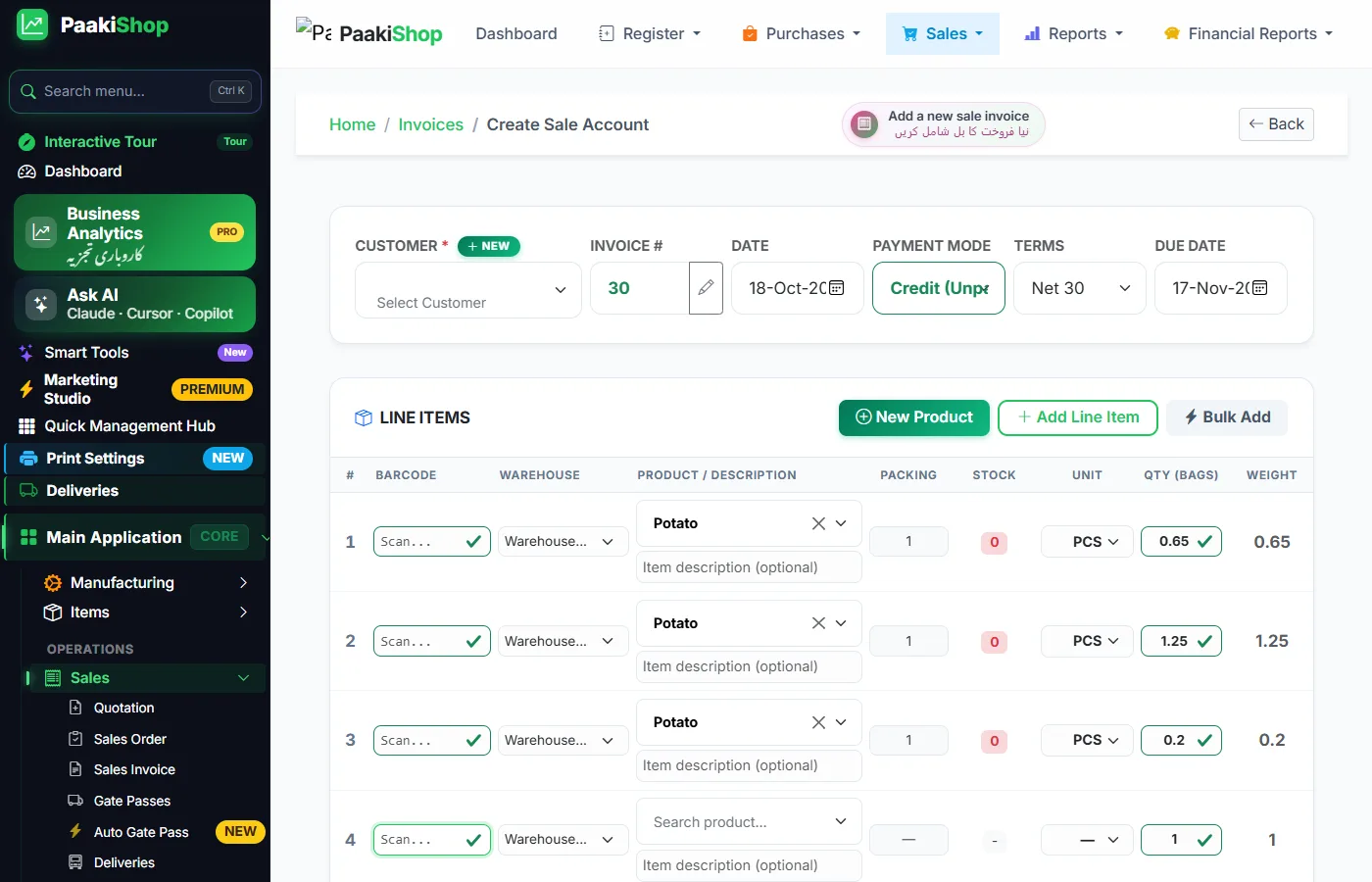
Sales invoice — three labels scanned, weights and amounts filled in.
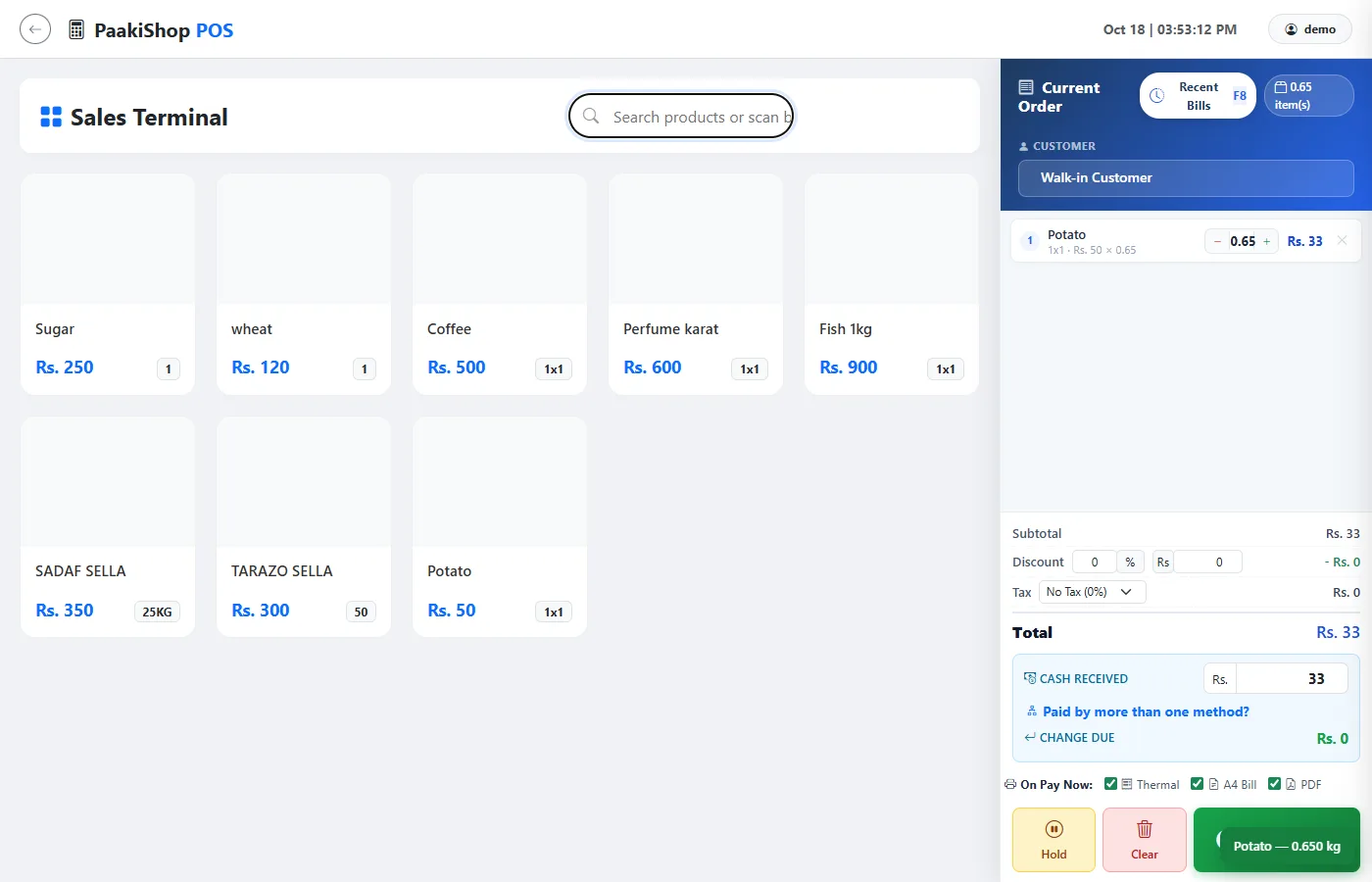
POS — the label adds Potato 0.650 kg with a beep.
Made for shops that sell by weight
Weighing scale barcode software — FAQ
Why does my scale barcode change every time?
A label scale writes the item code and the weight (or price) inside the barcode, so 0.650 kg and 0.700 kg of potatoes give different barcodes. Ordinary POS software looks for one fixed barcode and fails. PaakiShop reads the item code and weight out of the label.
Which weighing scales work with PaakiShop?
Any label scale that prints a standard in-store EAN-13 barcode, such as the Black Copper RLS1000 and most price-computing label scales sold in Pakistan. The prefix, item-code length and weight or price mode can be matched in Settings → Weighing Scale.
Do I need to connect the scale to the computer?
No. The scale prints the label and any ordinary USB or Bluetooth barcode scanner reads it into PaakiShop. No cable or driver between the scale and the computer is needed.
Does it work without internet?
Yes. The PaakiShop Offline desktop application reads scale labels with no internet and sends the sales to paakishop.com when the connection is back.
Will my normal product barcodes still work?
Yes. Only valid scale labels (prefix 20–29 with a correct check digit) are read as weight labels. Every other barcode works exactly as before.
Stop typing weights by hand
Scale label, scanner, PaakiShop — the item and the exact weight in one beep.
No credit card required · Works with your existing items & scanner · Urdu & English
Free Customization According to Your Need and Requirements
We do not charge for any customization. Whatever you want changed or added, we build it around the way you already work — and you only pay the monthly subscription. There is no customization fee, no setup fee, no per-feature price and no separate quote.
It applies to every kind of business: retail and wholesale, distribution and trading, manufacturing, and service businesses of every sort — anyone running sales, purchases, stock or accounts. Tell us your process and we shape the software to it: your invoice and receipt design, your stock and unit rules, your tax settings, your staff rights, and the exact reports you want open every morning. Need something that is not there yet? We build it, free, in English or Urdu, with local support on WhatsApp.

